Prepare a mosaic that reads at scale
The final output is where the two readings of a mosaic, whole image and tiny photographs, either both succeed or one gets lost. Plan from the viewer's feet backwards.
The planning chain
- Viewing distance
Where will people stand most of the time: a desk, a corridor, a hall?
- Tile size and count
Distance sets tile size; physical width divided by tile size sets the grid.
- Pixels per tile
Enough resolution that each tile stays sharp when someone steps in close.
- Surface and finish
Paper, canvas, aluminium or screen each change colour and glare.
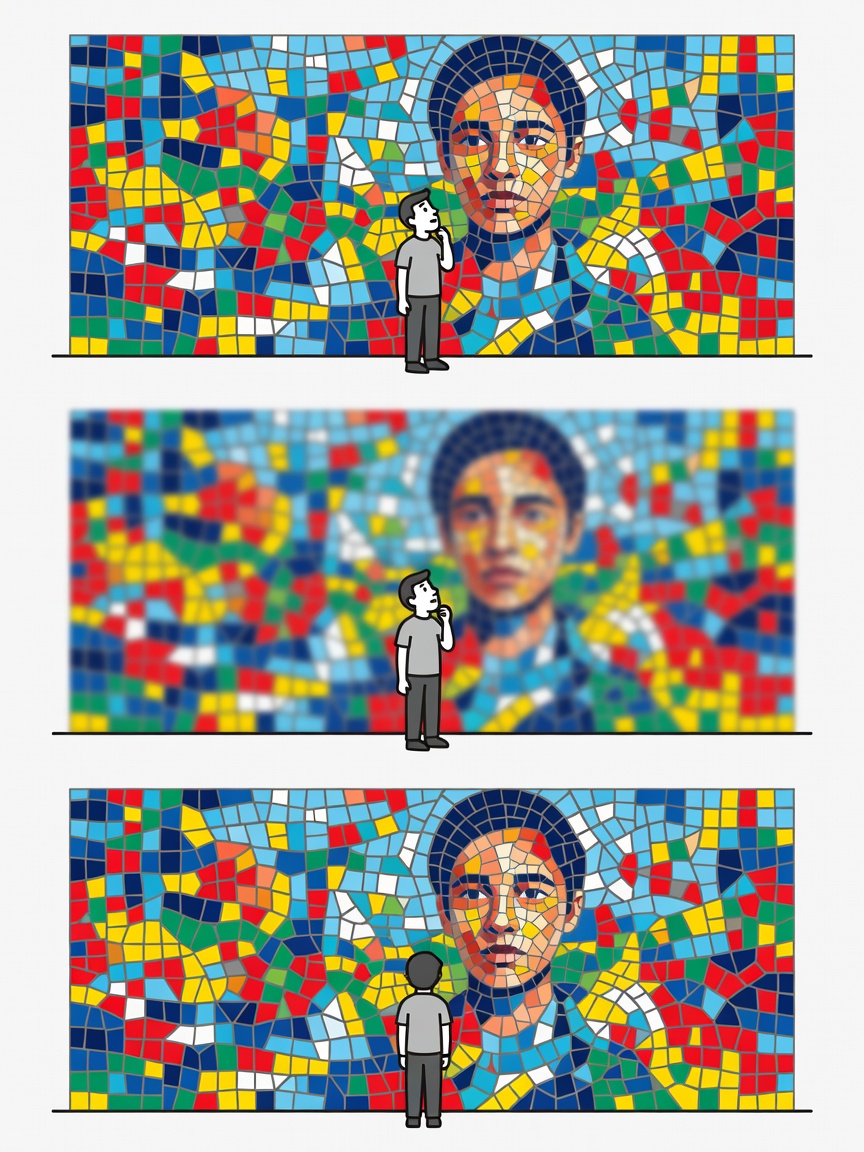
Size, distance and tile count
The figures below are workable starting points drawn from common practice. Contrast, subject and lighting move them, so always make a small proof.
| Format | Grid (approx.) | Tile edge | Whole image reads from | Tiles legible from |
|---|---|---|---|---|
| A3 print (29.7 × 42 cm) | 60 × 85 | about 5 mm | about 1 m | 20–30 cm |
| Poster 50 × 70 cm | 70 × 100 | about 7 mm | 1.5–2 m | about 40 cm |
| Wall print 100 × 140 cm | 50 × 70 | about 2 cm | 3–4 m | 60–80 cm |
| Banner 2 × 3 m | 60 × 90 | about 3.3 cm | 6–10 m | about 1 m |
| 4K screen (3840 × 2160 px) | 96 × 54 | 40 px | Normal seating | When zoomed |
Resolution and file size
For prints viewed up close, aim for roughly 200–300 pixels per inch at final size. A 100 × 140 cm print at 300 ppi is about 11,811 × 16,535 pixels, nearly 195 megapixels. That's a heavy file: uncompressed it can exceed half a gigabyte. Before rendering, check that your maker can export that size, that your computer has the memory, and that your print lab accepts it. Many labs prefer high-quality JPEG or TIFF and will advise their limits.
For wall pieces viewed from metres away, 150 ppi is often indistinguishable and halves each dimension. A useful compromise is to ensure each tile gets at least 150 to 250 pixels across, so a curious viewer stepping close still sees a crisp photograph rather than a blur.
Choosing a surface
- Matte fine-art paper: no glare, soft blacks; lovely for portraits seen in mixed light.
- Satin or lustre photo paper: richer blacks with mild sheen; a strong default.
- Canvas: texture breaks up tile edges slightly; forgiving but less crisp up close.
- Aluminium or acrylic: vivid and durable, with reflections to consider.
- Screens and projections: brightness flatters colour; offer a zoomable version so people can explore tiles.
Digital collages and interactive viewing
Not every mosaic needs paper. Exported as a large tiled image, a mosaic can be explored online with a deep-zoom viewer, which is especially rewarding for anniversary or community projects where people want to find their own photo. Mind privacy: publishing a zoomable mosaic publishes every tile.
Proof, then commit
- Print a 20 × 30 cm crop of the most important area at final scale.
- Pin it up and view it from the planned distance and from 30 cm.
- Adjust tint, contrast or tile size, then re-render.
- Order the full print only when both readings work.
Ready to map your project? Plan your mosaic